What's New
Center Windows 10 Taskbar icons and Start button with Falcon
Falcon is a free program for Microsoft's Windows 10 operating system that you may use to center icons and the Start button on the taskbar.
While you can make some modifications to the Windows taskbar, you are somewhat limited when it comes to the default options. You can move the taskbar to another edge of the screen, hide it by default, or change the icon size, but that is about it.
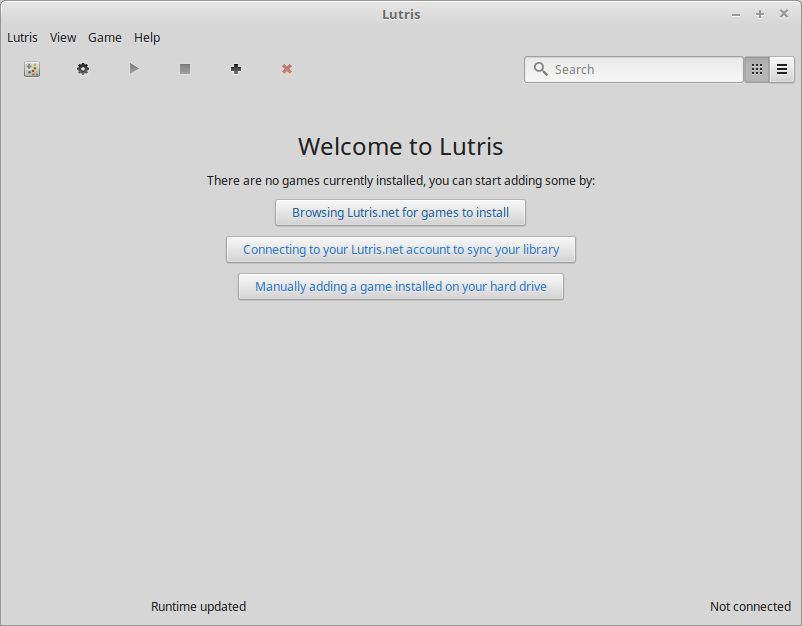
A look at Lutris – Open Gaming Platform for GNU/Linux
There’s plenty of gaming platforms out there nowadays, from Steam to Origin, it seems like you need to have almost as many gaming platforms as you do games installed.
GNU/Linux users are a bit more limited in their choice of games available, although thankfully more and more are being released all the time.
Lutris for Linux
Google pushes big Datally update for Android
Google released a new version of the company's data compression app Datally for Android yesterday; the update introduces new features and improves others.
The company launched the Datally application for Android in late 2017. We reviewed the first release version of Datally back in 2017 to give Android users better control over the device's data usage.
The initial version of Datally monitored the data usage on the Android device, offered tips to reduce data usage, and suggested public wireless networks that it picked up to save mobile data.
BitTorrent (and uTorrent) reportedly sold
A Variety report suggests that BitTorrent Inc, creators of the BitTorrent peer-to-peer protocol and owners of uTorrent and BitTorrent (client), has been acquired by blockchain entrepreneur Justin Sun.
How to use Android Messages on the desktop
Google revealed five new features for Android's default messaging app Messages yesterday. The first advertised feature unlocks options to read and send texts from desktop computer systems.
The new feature works similarly to how other messaging platforms including Google's now more-dead-than-alive Allo messaging app handled desktop integration.
Monitor the latency of a Windows PC with LatencyMon
LatencyMon is a free-for-home use software program for Microsoft Windows devices that monitors the latency of the system when run to point out issues and assess the system's real-time audio and other latency-depending performance.
Latency issues can impact the experience that you have when working on a computer. While you may not see much of an issue when editing Word documents, you may experience lag, stutter, freezes, and other issues while playing games or streaming content that are caused by latency issues.
Turn local OneDrive files to on-demand files automatically
Microsoft plans to launch a new OneDrive storage feature in the next feature update for Windows 10, out September/October 2018, that turns local OneDrive files to on-demand files automatically when the files are not accessed for a set period of time.
Chameleon for Firefox: user agent and data spoofer
Chameleon is a new open source extension for Mozilla Firefox that is a port of the Firefox add-on Random Agent Spoofer for the browser.
IOBit Uninstaller 8 comes with Bundleware monitoring
IOBit Uninstaller 8, the latest version of IOBits installation monitoring and software uninstallation program for Windows, comes with new bundleware monitoring capabilities among other new features.
The default option to remove installed software from Windows machines is pretty basic even though you may improve it. Some of the shortcomings are that you are limited to removing individual programs (no batch uninstallation), and that leftovers are not removed from the system.
Search the Windows Group Policy and look up Registry keys
NIT-GPOSearch is a free software program for Microsoft Windows devices that you may use to search the Group Policy to find policies quickly.
Professional versions of Microsoft's Windows operating system come with options to manage devices using the Group Policy. The program gives administrators some control over settings and features, and while it does not provide 100% control over them all, it is used widely especially by organizations and companies to limit and manage certain operating system features.
Windows Server 2008 SP2 switched to rollup model
The Microsoft Windows Server Team announced last week that Windows Server 2008 SP2 is moved from the current updating system to a rollup model.
The first rollup previews will be made available in August, the first final rollups on the September 2018 Patch Day.
Grab an offline copy of Microsoft Windows Live Essentials
Microsoft released the last version of Microsoft Windows Live Essentials, or Windows Essentials, back in the year 2012. While that is a long time ago, it is the case that some included programs are still useful and that first-party alternatives may not really be available.
Microsoft ended support for Windows Essentials 2012 in 2017 and removed all downloads of Windows Essentials and individual programs from its web properties.
Google working on Customize Background option in Chrome
Google Chrome engineers are working on a new customization feature that may introduce options to Chrome to set custom background images in the browser.
The feature is hidden behind a flag currently in Chrome Canary and anything but stable at this point in time. Still, it may make its way into Chrome Stable at one point in time so that it warrants a closer look.
Map or disable mouse buttons 4 and 5 on Windows
Mouse Manager is a free program for Microsoft Windows devices that gives you full control over the functionality of the mouse buttons 4 and 5.
Many computer mice have more than three buttons. While you can still buy a mouse with two or three buttons only, you may also buy mice with five or more buttons as well or other crazy designs.
Especially gaming mice tend to come with a lot of buttons that you can map all kinds of in-game actions to.
Add WebP support to Microsoft Edge
Microsoft published a new application for Windows 10 that adds support for Google's WebP media format to Windows 10 and Microsoft Edge.
WebP is an image format developed by Google that supports lossy and lossless compression. Google announced the format in September 2010 and integrated support for the WebP format in the company's Chrome browser.
Google claimed that WebP offers size reductions when compared to popular formats such as PNG that do not affect the quality of the image.