What's New
Microsoft on freeing up space for Windows 10 Updates
Microsoft published a new support article "Windows 10 update issues on devices with low storage space" yesterday.
Released in time for the next feature update for the operating system, Windows 10 version 1809 also known as the October 2018 Update, it highlights that updates may fail when disk space is low and provides suggestions on how to free up disk space.
What you can do if your browser uses too much Memory
While web browsers were never the leanest applications memory-wise, memory usage of web browsers seems to have exploded in recent time.
It is not uncommon anymore that browsers such as Chrome or Firefox cross the two or three Gigabyte memory mark; a growing number of users is concerned about the memory use of browsers. But, should they be concerned?
This guide provides you with instructions on taming a browser's memory usage. It also answers whether you should be worried about memory use.
Is high memory use a problem?
Prevent Firefox from reopening on Windows 10 start
Microsoft added a feature to the Fall Creators Update of Windows 10 that restarts select applications that were open when the restart or shutdown command was activated.
The feature lets users continue where they stopped on the next start of the operating system.
Firefox reopens automatically on Windows 10 by default similarly to how Microsoft Edge or Google Chrome get opened automatically by default if the programs were not closed by the user before running the commands.
What is Microsoft Managed Desktop?
Microsoft pushed Software as a Service ever since the company's CEO changed. First, in the form of Office 365 which the company launched as a subscription-based option next to the classic Office desktop applications, and then later on in a package with Windows which Microsoft called Microsoft 365.
Microsoft 365 is only available for Enterprise, Education, and business customers. Both services have in common that they are subscription-based.
Windows 10 version 1809: removed and deprecated features
As is the case with all new Windows 10 feature releases, some features have either been removed outright from the new version or put on hold for removal in a later version.
Tip: check out the removed and deprecated features of Windows 10 version 1803 here.
The removed features in the October 2018 Update won't affect many users; it may have an impact on some businesses and Enterprise customers.
Improve your privacy on Android with Bouncer
Bouncer is a new paid application for Google's Android operating system designed to give users more control over application permissions.
Permissions give applications extra things that they may access or do and while that is required sometimes for an application to function properly, it is not needed or even abused at other times.
While you could go ahead and only install apps that don't require extra permissions or toggle permissions manually each time you use an application, it is not really that comfortable of a solution.
Windows 7 to Linux: Preparations
This is the first part of a series of articles that describes how to migrate from a Windows 7 device to a device running Linux. The main motivation behind the series of tutorials is to provide Windows 7 users with instructions to migrate to a Linux distribution and not to Windows 10.
Pure CSS crashes iPhones affects some browsers
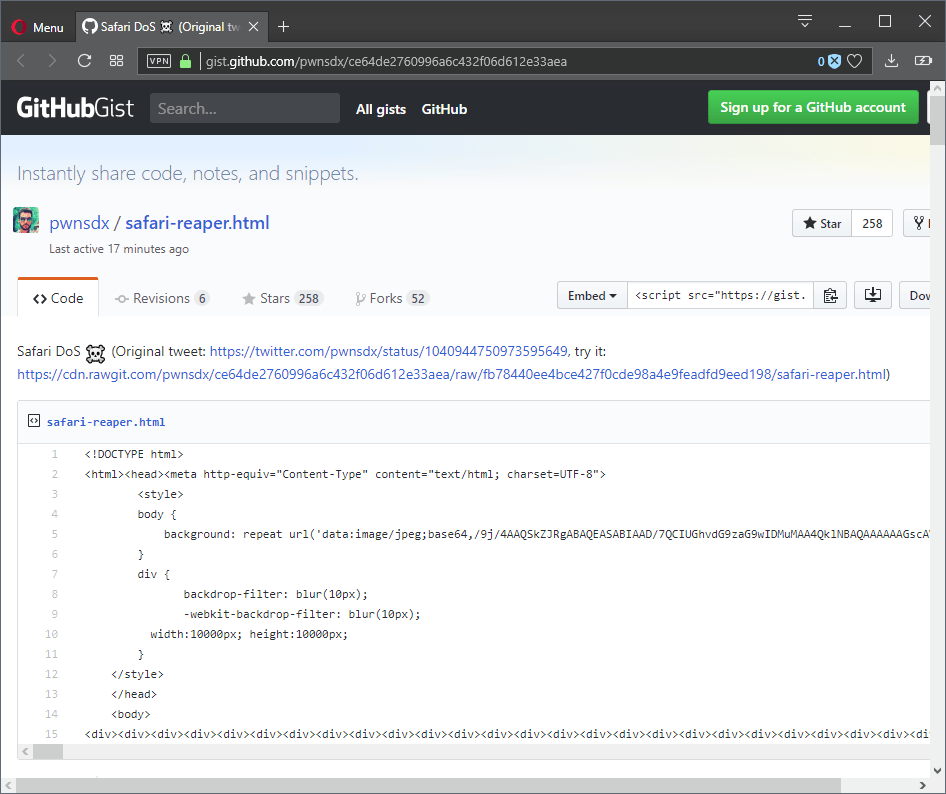
A couple of lines of code that runs in any modern web browser by default may crash Apple's Safari web browser, iPhones and affects select browsers as well.
The code uses the backdrop-filter property and a lot of Div elements (more than 3000) to crash Apple iPhones immediately and freeze certain browsers even on non-iOS systems.
Disable Adobe Flash in Edge and IE
Microsoft integrated Adobe Flash natively in newer versions of the Windows operating system so that the built-in web browsers Internet Explorer and Microsoft Edge can make use of it automatically.
The approach offers some benefits: first that Microsoft is in charge when it comes to updates for Adobe Flash, and second that the browsers are compatible with Flash content out of the box.
Winamp 5.8 Beta leak appears on the Web
A beta version of the upcoming Winamp 5.8 media player found its way to the darker side of the Web where it is now being distributed heavily.
Winamp, which was once a very popular media player for Microsoft Windows devices and is still used by die-hard fans up to this day, has had a rough patch in recent years.
Chrome's Gmail Offline extension gets the axe
Google revealed last week that the rather popular Gmail Offline extension for the Chrome web browser will be discontinued.
The extension enables offline access for Gmail emails in the Chrome web browser. Current stats show that it is used by over 6 million users at the time of writing and that it has been updated in 2013 for the last time.
Waterfox 56.2.3 Security Update
The developer of the Waterfox web browser, Alex Kontos, released version 56.2.3 of Waterfox to the public yesterday. The new version of Waterfox is a security release that follows Mozilla's Extended Support releases loosely.
Mozilla enables WebRender on qualifying Firefox Nightly installations
Mozilla enabled the new WebRender component of the Firefox web browser by default on Firefox Nightly installations that meet the system requirements.
WebRender is a new technology that makes better use of a device's video card to improve overall performance.
The project reached a new milestone recently when Mozilla activated WebRender by default on Nightly versions of the Firefox web browser if a supported Nvidia video card is installed and if the operating system is Windows 10. Mozilla ran a Shield Study before that to test WebRender on Firefox Nightly.
VeraCrypt encryption software review
VeraCrypt is an encryption software that is a fork of the discontinued TrueCrypt encryption software. It can best be described as a continuation of TrueCrypt that supports all features that TrueCrypt supported plus a set of improved or new features.
Since it is based on the popular application it supports options to create encrypted containers, encrypt entire hard drives and to encrypt the system partition of the computer system. The popular option to create hidden encrypted volumes is supported as well.
Microsoft confirms Disk Cleanup tool deprecation in Windows 10
Microsoft announced plans to deprecate the classic Disk Cleanup tool in Windows 10 on the official Windows and Windows Server storage blog.