Microsoft rolls out a bunch of AI features for Windows 11
Microsoft has announced that it has begun rolling out several AI features for Windows 11 PCs. Only a couple of these options are available for non-Copilot+ PCs.
Let's start with the ones that are exclusive to Copilot+ PCs. Windows 11 users can access AI features in the Settings app to change things, or get recommendations, simply by typing their query.
For example: Open Settings and type, "I want to enable quiet hours", or "connect Bluetooth device", or "change my resolution to 1920×1080." The AI will offer options to complete the action, and can also undo settings that you change.
Microsoft says that the AI agent in Settings supports hundreds of options. The Redmond company has uploaded a video on YouTube that demos the AI-powered Settings app.
Click to Do now lets you improve your reading fluency and pronunciation with the Practice in Reading Coach. It requires a free app to be downloaded from the Microsoft Store to work. Users can choose the "Read with Immersive Reader"?text action to read text in a distraction-free environment, with customizable text size, spacing, font, background theme, speech-to-text, and more. Microsoft 365 Copilot subscribers can access Draft with Copilot in Word to create drafts from sentences and snippets.
Microsoft Teams users can use Click to Do to perform text actions when selecting an email address, for instance, to send a message to schedule a meeting on Teams.
Note: Click To Do actions are not available in the European Economic Area.
The Photos app has a Relight option that can be used to place up to three virtual light sources around your subject, with options to adjust the intensity, color, position of each light. There are also some presets that can be used to relight images. (Available for Snapdragon X series PCs now, coming soon to Intel and AMD Copilot+ PCs)
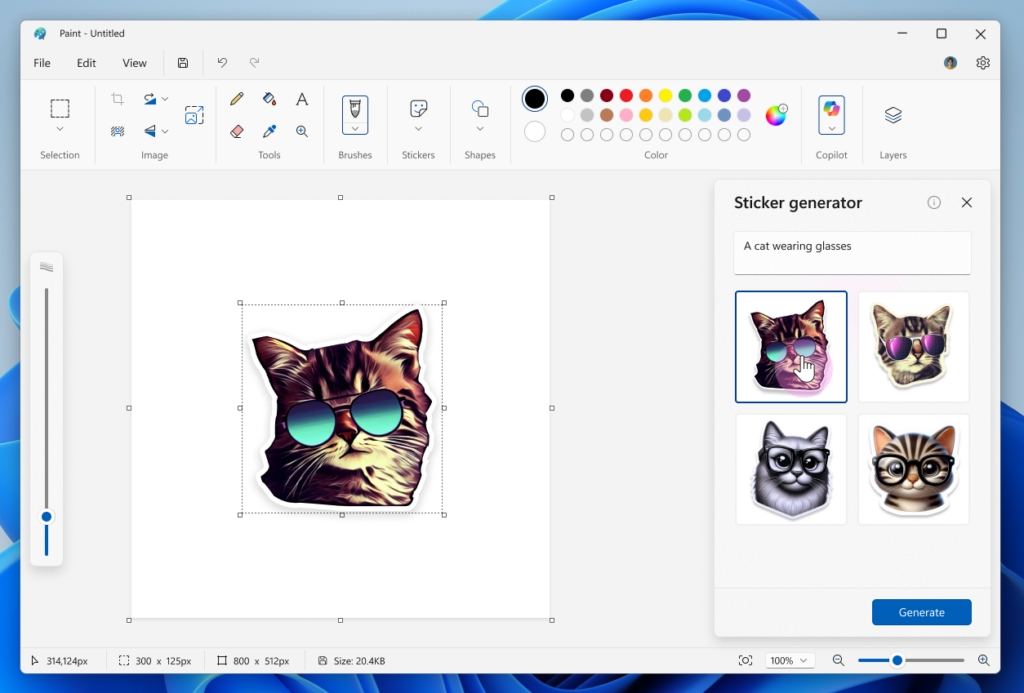
Microsoft Paint can now generate stickers based on your prompt. These AI-generated stickers can be used in any app. Paint is also getting an object select tool, allowing the AI to isolate individual elements in a photo.
Snipping Tool brings a perfect screenshot option that resizes images intelligently when you select the rectangle mode to capture a region on the screen. (also exclusive to Copilot+ PCs).
The following features are available for all PCs. Snipping Tool also has a new color picker tool which can identify HEX, RGB or HSL values.

Copilot Vision allows users to interact with the AI, and ask it to analyze the content displayed on the screen. It works in browsers and other apps, and you can talk to it using your voice.
Note: Copilot Vision is currently available for users in the U.S.
Microsoft is also releasing a Game Bar feature called Edge Game Assist, which offers tips, guides, quick access to Discord, Spotify, Twitch, when you play games.
The announcement says that quick machine recovery, via Windows Recovery Environment (WinRE), is now available for Windows, to assist users by automatically detecting and fixing widespread issues that result in unexpected restart.
Microsoft claims that it has managed to reduce the expected restart experience, from 40 seconds to just 2 seconds on Windows 11 version 24H2.
Microsoft says that the AI features will be gradually rolled out to users over the next month, but also says that some of the experiences are available today via a non-security preview update that is available for Windows 11. Some features will be added via updates to apps through the Microsoft Store. That is one big pile of AI!
Thank you for being a ComTek4u TechTips reader. The post Microsoft rolls out a bunch of AI features for Windows 11 appears on ComTek4u TechTips. (via Ghacks)